16 November 2013

Binary Conversions

Hello Coders.

Today I would like to discuss about binary digits.
If you don't know what a binary digit is, here is a simple explanation:

A Binary Digit is a digit of number whose value is either 0 or 1.

In computer, the 0s and 1s indicate electrical signals.
1 indicates ON, 0 indicates OFF.

As we have learned in the previous post about data types,  a character has a size of 1 byte.
1 byte equals to 8 bits.

Basically a set of binary digits make up 1 byte, or 8 bits.

Examples: 1111 1111, 0000 1010, 1010 1110, etc.

What can we do with those 1s and 0s?

You can convert them to decimals, octals, and hexadecimals.
Also, you can use the AND, OR, and XOR operators to perform special conversions.

Converting Binary to Decimal 

Each digit of binary represents a decimal value which is 2n, where 0 <= n < 8 .

The leftmost digit in an 8-bit set of binary digits has the value of 27 while the rightmost has the value of 20. The digits in between has the value from 26 to 21 in a left-to-right order.

Let's go right to the examples:
  • 11111111 = 1*2^7 + 1*2^6 + 1*2^5 + 1*2^4 + 1*2^3 + 1*2^2 + 1*2^1 + 1*2^0 = 255
  • 00000001 = 0*2^7 + 0*2^6 + 0*2^5 + 0*2^4 + 0*2^3 + 0*2^2 + 0*2^1 + 1*2^0 = 1
  • 01010101 = 0*2^7 + 1*2^6 + 0*2^5 + 1*2^4 + 0*2^3 + 1*2^2 + 0*2^1 + 1*2^0 = 85
  • 00110010 = 0*2^7 + 0*2^6 + 1*2^5 +1*2^4 + 0*2^3 + 0*2^2 + 1*2^1 + 0*2^0 = 50

So let's say you have sets of 3-bit binary digits:
  • 111 = 1*2^2 + 1*2^1 + 1*2^0 = 7
  • 010 = 0*2^2 + 1*2^1 + 0*2^0 = 2
  • 000 = 0*2^2 + 0*2^1 + 0*2^0 = 0
  • 100 = 1*2^2 + 0*2^1 + 0*2^0 = 4 

 Or sets of 4-bit binary digits:
  • 0111 = 0*2^3 + 1*2^2 + 1*2^1 + 1*2^0 = 7
  • 1010 = 1*2^3 + 0*2^2 + 1*2^1 + 0*2^0 = 10
  • 0100 = 0*2^3 + 1*2^2 + 0*2^1 + 0*2^0 = 4
  • 1001 = 1*2^3 + 0*2^2 + 0*2^1 + 1*2^0 = 9
 There you go. You are now capable of converting binary digits to its decimal value.


Converting Binary to Octal

In converting binary(base-2) to octal(base-8), you need to understand that octals are numbers ranging from 0-7 only. This means that 777 exists while 008 doesn't.

To convert an 8-bit binary to its octal value, you need to separate it into 3-bits at a time, starting from the right. Like this:
1111 1111 =  11 | 111 | 111
Three bits at a time? Why is there a 2-bit part then? Simple add 0 in front to make it 3-bits. Notice that 011 == 11 in binary. So, here is the digits after separation:
011 | 111 | 111
Then what?

Calculate each part, convert them to its decimal value.

011 = 2+1 = 3
111 = 4+2+1 = 7
111 = 4+2 +1 = 7

So, 11111111(2) = 377(8)

Another example:
1010 1010 = 010 | 101 | 010 = 252(8)

Converting Binary to Hexadecimal

Hexadecimal numbers range from 0 to F: 0,1,2,3,4,5,6,7,8,9,A,B,C,D,E,F.
In order to convert to Hexadecimals(base-16), you will need to separate the bits four at a time.

Example:
1111 1111(2) = ..... (16)

= 1111 | 1111 
= 1*2^3 + 1*2^2 + 1*2^1 + 1*2^0 | 1*2^3 + 1*2^2 + 1*2^1 + 1*2^0
= 15 | 15
= FF(16)

1001 1100(2) = ..... (16)

= 1001 | 1100
= 1*2^3 + 0*2^2 + 0*2^1 + 1*2^0 | 1*2^3 + 1*2^2 + 0*2^1 + 0*2^0
= 9 | 12
= 9C(16)

Using the AND(&&) Operator

Here is what the AND operator does when two values are passed to it.

p   q   p AND q
   1       1         1
1   0         0
0   1         0
0   0         0

Let's assume we have two sets of binary digits: 11110101 and 00110101. Using the AND operator, we will receive the result:

11110101
00110101 AND
00110101

Another example with 00001110 and 11101100.

00001110
11101100 AND
00001100


Using the OR(||) Operator

The table of OR looks like this:

p   q   p AND q
   1       1         1
1   0         1
0   1         1
0   0         0

So, if your perform an OR on 11110000 and 00001111, you will get:

11110000
00001111 OR
11111111
It is similar to the AND operator, only with different rules.

Using the XOR(^) Operator

The XOR Operator is also called the Exclusive OR. Its table has values like this:

p   q   p AND q
   1       1         0
1   0         1
0   1         1
0   0         0

It can be used to swap digits. Let me show you.


Let A be 00110011 and B be 01011100.
We would like to swap the value of A and B.
We can use the XOR Operator to accomplish the task, like this:

A = A ^ B
B = A ^ B
A = A ^ B

The formula can also be simplified as A^=B^=A^=B

The process looks like this:
A = 00110011
B = 01011100 XOR
A = 01101111

A = 01101111
B = 01011100 XOR
B = 00110011 ------------------- B is now A

A = 01101111
B = 00110011 XOR
A = 01011100 ------------------- A is now B
These concepts can be applied to your programming. For example you can create a swap function using the XOR operator.


Good luck trying, pals.


Regards,
Cyber Frost

09 November 2013

The For Loop in C

The loop is one of the most critical parts of programming.
According to Wikipedia, a loop is a sequence of statements which is specified once but which may be carried out several times in succession. Read more about Loops here.

So, basically, a loop is a statement used to repeat one or more actions for a specified number of times.

There are two types of loop :
  1. Finite Loop
  2. Infinite Loop
When looping, in most cases, you would want to avoid infinite loops because it might crash your whole system.

There are actually several kinds of Loops in C which are the For loop, the While loop, and the Do...While Loop. But today, we are going to discuss about the For loop.


Let's go straight to the syntax of declaring a for loop:
for(initial_condition;loop_condition;increment){
//statement1
//statement2
//....
}
The initial condition is set by assigning a value to a variable, called Control Variable.
The loop condition is the condition to be checked at the start of every loop cycle. If the condition is true, continue the looping process, else, break(or stop) the process.
The increment is the value added to the Control Variable at the end of every loop cycle.
The statements within the parentheses are the statements to be executed in every cycle of the loop.


Example:

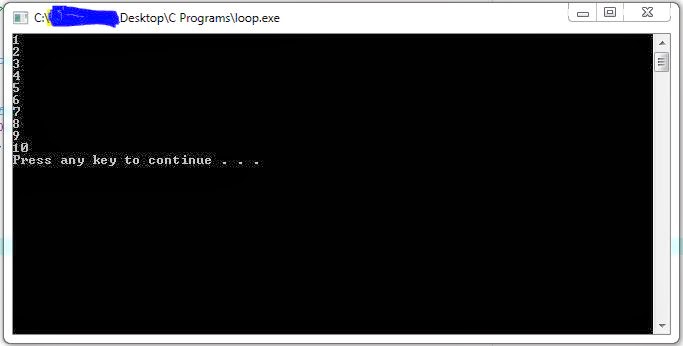
Output numbers from 1 - 10 using no more than 1 printf function.
 #include <stdio.h>
#include <stdlib.h>

int main(){
 //declaration of control variable
 int i = 0;

 //declaration of for loop
 for(i = 1; i <= 10; i++){
     printf("%d\n", i);  
    }
   
 system("Pause");  
 return 0;  
}
Magically, it works. Here is the result :


Let me explain the loop declaration part.

There is i = 1, this means, the count starts from 1.
Then, there is i <= 10, this indicates that the loop will only end after i is larger than 10. If i is still in range (1-10), the loop will continue to display i, which is incremented by 1 every cycle by using the i++ statement.

Note : You can also use +1 increment this way -> i += 1


Okay, let's mess a little with the increment part of loop now.
Let us create two loops to display odd and even numbers from 1-10, respectively.

#include <stdio.h>
#include <stdlib.h>

int main(){
 //declaration of control variable
 int i = 0;

 //declaration of for loop for odd numbers

 printf("Odd numbers:\n");
 for(i = 1; i <= 10; i += 2){
     printf("%d\n", i);  
    }

 //declaration of for loop for even numbers  
   
 printf("\nEven numbers:\n");  
 for(i = 2; i <= 10; i += 2){
     printf("%d\n", i);  
    }  
   
   
 system("Pause");  
 return 0;  
}

As you can see from the code, there are two for loops having the same increment but producing different results. If you look closely, you will find that the only difference is in the initial value of both loops. To obtain odd numbers, you start from 1 and add by 2 each loop. However, in order to display even numbers, you need to start from 2(the first even number in range) and increment it by 2 through the loop. You can see the result below:


To close this post, I would like to present you with an example of creating an infinite loop.
Despite the fact that we are doing it in purpose right now, it might happen a lot as accidents in programming later on. Here it is:

#include <stdio.h>
#include <stdlib.h>

int main(){
 //declaration of control variable
 int i = 0;

 //declaration of for loop for odd numbers

 for(i = 1; i <= 10; i--){
     printf("*");  
    }
    
   
 system("Pause");  
 return 0;  
}

 It prints the * symbol endlessly. Why? As you can see, the loop condition is i <= 10 while the loop increment is i--. This ensures that the i never reaches 10 or above(not even 2 actually).

Note: To stop the program, press Ctrl + C


Loops can be used for many occasions, you have to experiment by yourself in order to be fluent in using loops. Any questions are welcomed. Post them here as comments or send it to my email at cyberfrostprogrammer@yahoo.com.

Thank you for reading.


Happy Coding,
Cyber Frost


30 October 2013

Arrays and Self-Pointers

Let's jump a little bit further to "Arrays and Self-Pointers".
I apologize to go directly to this part, but I do have to explain this now. I will go back to the basics later on.

First of all, let's define the meaning of an Array. An array is a group of contiguous memory location that has a predefined size as well as one data type for all its elements.

Before I can explain the terms contiguous, predefined size, and one data type, I will first show you an example of array declaration :

  data_type array_name[size] = {element-1, element-2, element-2, ... , element-size};
Just like variables, you need to initialize the elements in an Array before using it to prevent runtime errors. It is done by assigning values to each of the elements in the array using the equal sign (=) then followed by an open parenthesis and the value of element-1, element-2, and so on, then finally closing it up with a closing parenthesis.

 Now, I am going to explain about the terms.
  • Contiguous
           It means every element in an Array is located next to one another in the memory depending on  their index. Why is this so important?

           With this feature of array, it is possible to do sorting, searching, and many more since you can easily loop through every element in an Array due to its elements contiguous memory location. This will be shown in an example later in the post.

  • A Predefined Size
           Since an Array's memory locations for its elements need to be contiguous, it needs a proper declaration for size, so that it can allocate the space in the memory for storing the value of the elements it has.Once the size is declared, an array cannot be resized during runtime.

  •  One Data Type
            An Array can only store elements of one uniform data type.
            Example : an int array can only store integer values in it.
            Why? If you refer to the previous post about variables, you can see that every data type has different sizes, so, if you store a double value into an integer array, you will absolutely get the wrong value when you use the value again, which is why you can only store values with the same data type.

Viewing The Value of An Array Element

To look at the value of an array element, you can simply use printf or any other output functions in C.

Note : An array index starts from 0, so an array[0] will have indexes of 0-9 only.

#include <stdio.h>
#include <stdlib.h>


int main(){
//Declaring an Integer Array with the size of 4
 int array[4] = {1, 3, 5, 7};
//Prints the value in index 0 of array[4]
 printf("array[0] = %d\n", array[0]);  
//Prints the value in index 1 of array[4]
 printf("array[1] = %d\n", array[1]);  
//Prints the value in index 2 of array[4]
 printf("array[2] = %d\n", array[2]);  
//Prints the value in index 3 of array[4]
 printf("array[3] = %d\n", array[3]);
/*Pausing the screen to see results,
**because dev-cpp does not freeze at the end of program
**/ 
 system("Pause");
//returns 0 to indicate successful run
 return 0;  
}
 To see how it works, just type the code into your Dev-Cpp (or other IDEs) and run.

Assigning Values to Array Elements

To assign values to an array element, you simply use this syntax:
array_name[index] = value;
 Example:

    #include <stdio.h>
    #include <stdlib.h>


    int main(){
    //Declaring an Integer Array with the size of 4
     int array[4] = {1, 3, 5, 7};
    //Prints the value in index 0 of array[4] before value changes
     printf("array[0] = %d\n", array[0]);
    //Asigns value 9 to array[0]
     array[0] = 9;
    //Prints the value in index 0 of array[4] after value changes
     printf("array[0] = %d\n", array[0]); 
    system("Pause");
    return 0;
    }


Self-Pointers

Now, we come to an interesting part of the Array data structure.
Please take note that : An array's name is  the address of its first element in memory.

Let's say you have an array of size 10.
Assuming that the address of its first element is 123, the address of its second element would be 124, and the address of its third element would be 125, and so on. How is that possible? Scroll to the Contiguous section.

Now how can we make use of that?
First, I would like to introduce Pointer to you.
A pointer is a variable that stores the memory location of another storage types(variables, arrays, etc.).
Okay, so it stores memory locations, now what?
If you assign an array's name to it, what happens?  It stores the location of the first element of the array in the memory. Then what can you do with that?
You can easily do pass-by-reference to functions, you can do self-pointing, you can also view/modify the value of an array element without actually having to access the array itself (indirection), and many more.

As an example, I will show you how to use pointers to self-point using an array.

#include <stdio.h>
#include <stdlib.h>


int main(){
//Declaring an Integer Array with the size of 4
 int array[4] = {1, 3, 5, 7};

 printf("Viewing array elements through indexes :\n");
//Prints the value in index 0 of array[4]
 printf("array[0] = %d\n", array[0]);  
//Prints the value in index 1 of array[4]
 printf("array[1] = %d\n", array[1]);  
//Prints the value in index 2 of array[4]
 printf("array[2] = %d\n", array[2]);  
//Prints the value in index 3 of array[4]
 printf("array[3] = %d\n", array[3]);
 printf("\nViewing array elements through self-pointers :\n");
 //Prints the value in location 'array'
 printf("array[0] = %d\n", *array);  
//Prints the value in location 'array+1'
 printf("array[1] = %d\n", *(array+1));  
//Prints the value in location 'array+2'
 printf("array[2] = %d\n", *(array+2));  
//Prints the value in location 'array+3'
 printf("array[3] = %d\n", *(array+3));

 system("Pause");
 return 0;  
}


You can also assign values to an array element using a self-pointer.

    #include <stdio.h>
    #include <stdlib.h>


    int main(){
    //Declaring an Integer Array with the size of 4
     int array[4] = {1, 3, 5, 7};
    //Prints the value in index 1 of array[4] before value changes
     printf("array[1] = %d\n", array[1]);
    //Asigns value 9 to array[1] using a pointer
     *(array+1) = 9;
    //Prints the value in index 1 of array[4] after value changes
     printf("array[1] = %d\n", array[1]); 
    system("Pause");
    return 0;
    }


That was just a preview on Pointers. More on next posts.
Hope it inspires you.


Happy Coding,
Cyber Frost

Search